Under the Send To tab, you will determine the recipients of the email notifications.
There are usually multiple options under the Send To tab. You can select just one recipient option, all of them, or a combination of your choice.
IMPORTANT: Ensure that all selected recipients have email addresses set up on their records.
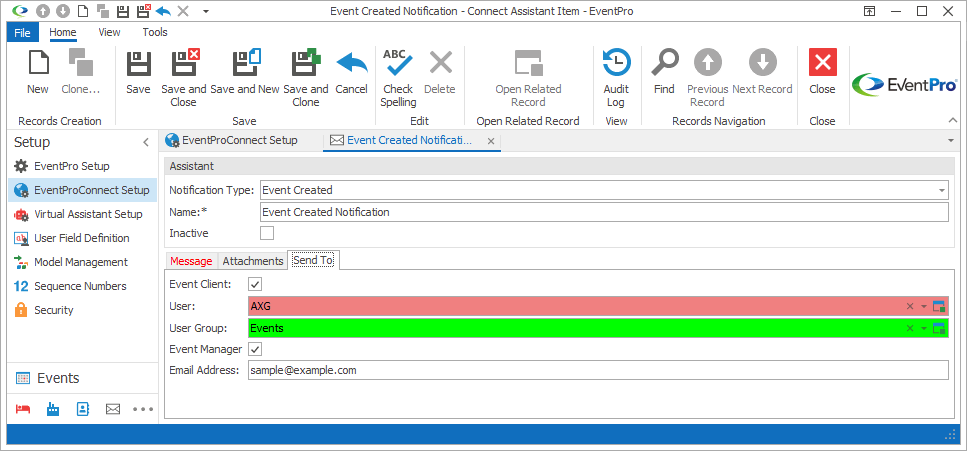
Figure 954: Selecting Send To Recipients
While each type of Notification will have slightly different Send To options, these recipient options are common to all of the Notifications:
•User: From this drop-down, you can select a specific Security User in EventPro. Users are defined under Security Setup / Users.
•User Group: From this drop-down, you can select a group of Security Users. These groups are defined under Security Setup / User Groups.
You will also see this Send To option for most of the notifications, except the Request Account types.
•Email Address: In this field, you can manually enter an email address, or multiple email addresses separated by commas or semicolons.
This list includes the Send To options available for each Notification Type:
Event Created
•Event Client
•User
•User Group
•Event Manager
•Email Address
Event Edited
•Event Client
•User
•User Group
•Email Address
Enquiry Created
•Opportunity Client
•User
•User Group
•Email Address
Registration Created
•Attendee
•Guests
•User
•User Group
•Email Address
Registration Modified
•Attendee
•Guests
•User
•User Group
•Email Address
Registration Accepted
•Attendee
•Guests
•User
•User Group
•Email Address
Registration Declined
•Attendee
•Guests
•User
•User Group
•Email Address
Exhibitor Created
•Exhibitor
•User
•User Group
•Email Address
Exhibitor Modified
•Exhibitor
•User
•User Group
•Email Address
Exhibitor Accepted
•Exhibitor
•User
•User Group
•Email Address
Exhibitor Declined
•Exhibitor
•User
•User Group
•Email Address
Exhibitor Reset Password
•Account
•User
•User Group
•Email Address
Request Account Email Confirmation
•Lead
•User
•User Group
Request Account Success
•Account
•User
•User Group
Request Account Denied
•Lead
•User
•User Group
Request Account Reset Password
•Account
•User
•User Group
Next topic: Save & Close